Vendor security
Assess your vendors with their evidence.
Gather security signals, documents and company context. Distinguish what is declared, detected or confirmed before approving a service.
Swipe across the visual to read the details.
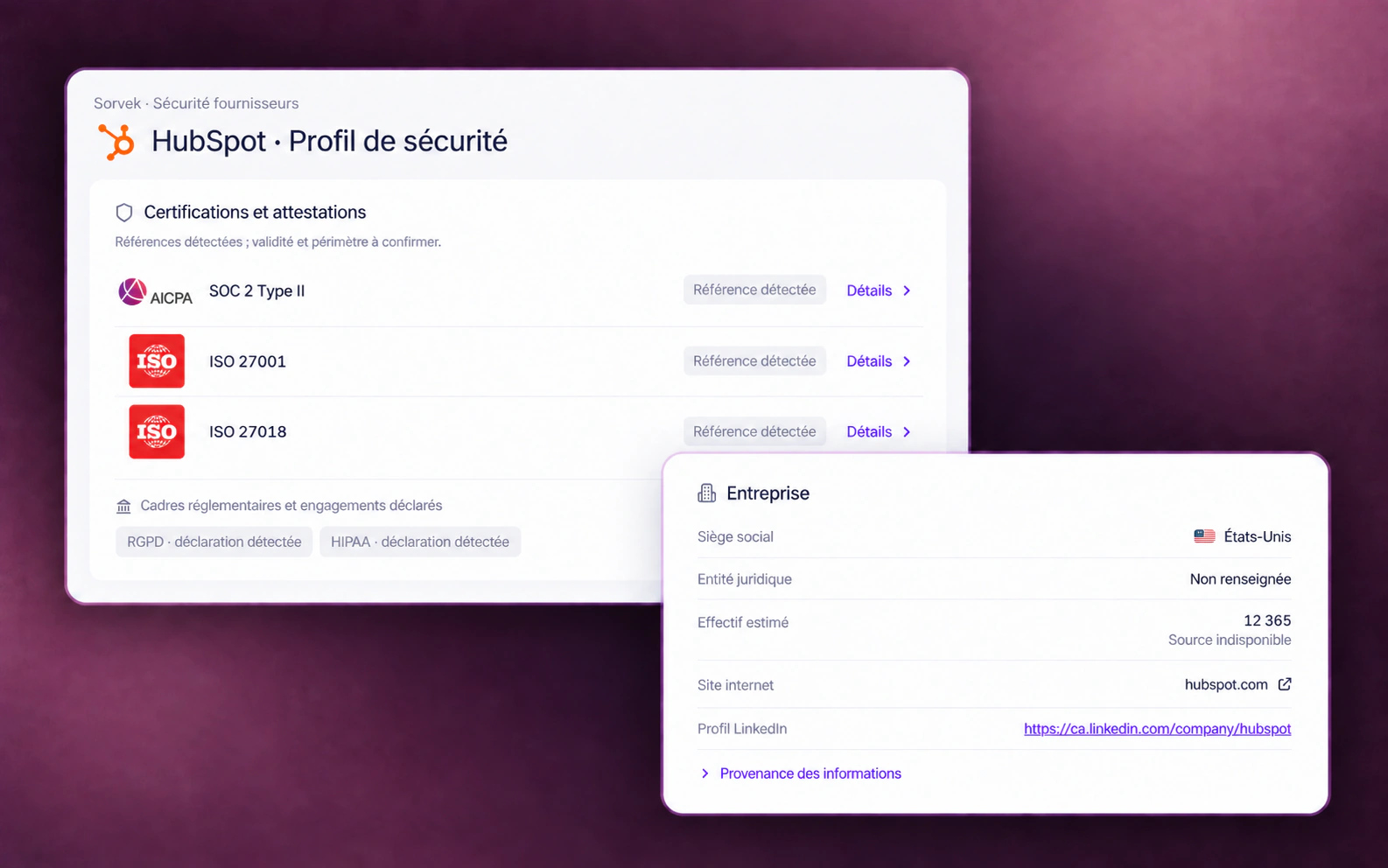
Each signal has its level of evidence.
Find the available source, date and scope. Missing information should remain visible in the decision.
- Certifications and company context
- A detected SOC 2 or ISO reference is a reason to review the document, its validity and the services covered. It does not prove an audit verified by Sorvek. Company information may be estimated or missing.
- Authentication and documents
- Find advertised methods, such as SSO, MFA or SCIM, and available documents. A method supported by the vendor is not necessarily enabled in your accounts.
- Services and subprocessors
- Examine service dependencies and named subprocessors. Distinguish a probable association from a confirmed connection and verify each party's role.
- Direct or indirect incidents
- Place an incident at the vendor or within its dependencies in context. Check the affected services and periods before concluding that your business was exposed.
- Data and AI tools
- Review available policies on retention, data use and model training. Their application may depend on the plan, contract and selected settings.
Geographic context
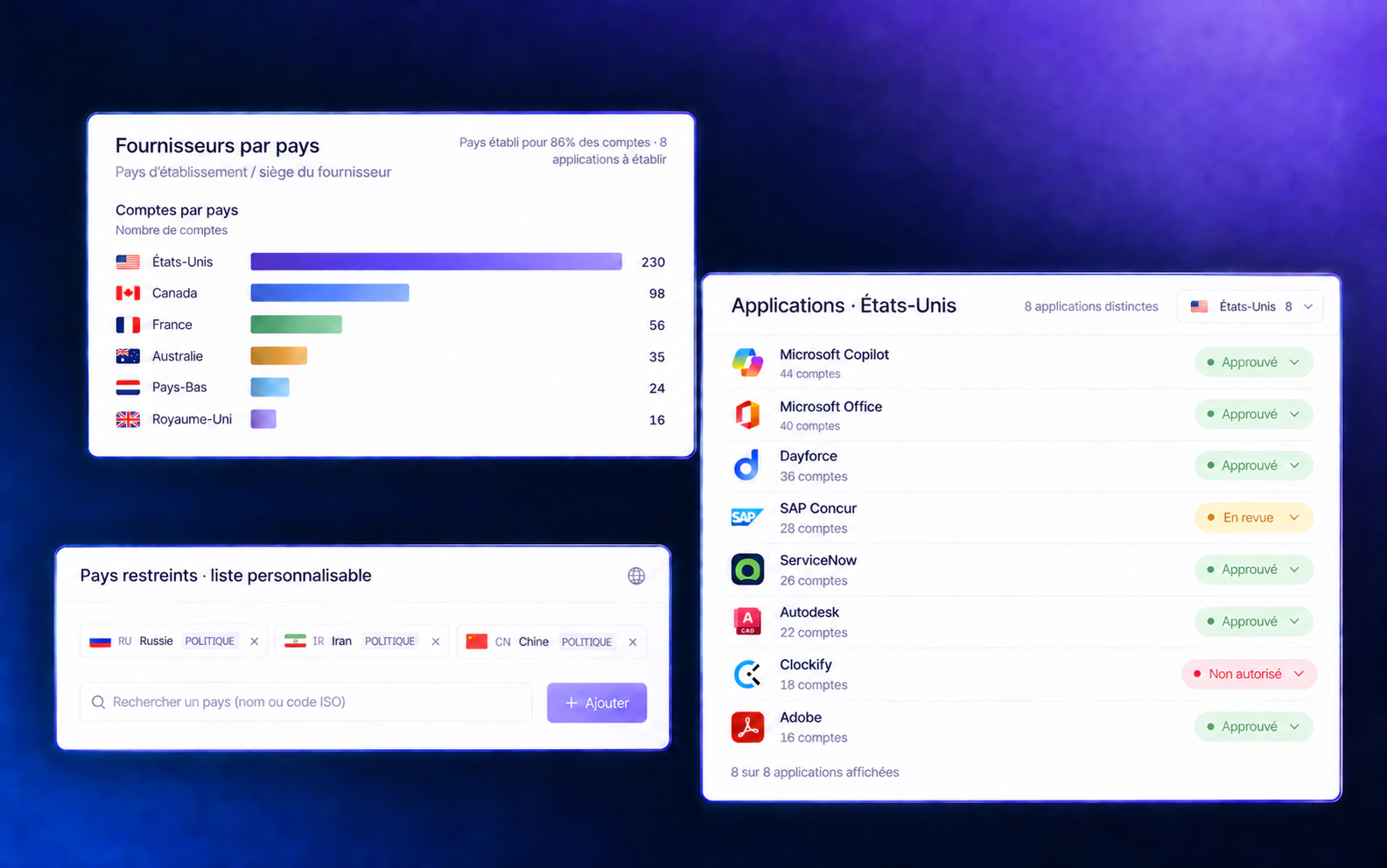
Vendors by country.
Locate the reported country of your vendors’ headquarters or establishment, then find the associated applications and accounts.
About this visual
Demonstration composition based on a Sorvek screenshot. Fictional accounts, distributions, coverage and statuses. Restricted countries illustrate a customizable policy, not a recommendation. Logos identify applications without implying a partnership. No blocking or notification is executed in this visual. The visual’s interface remains in French.
- Headquarters or establishment
- A vendor’s country does not determine data residency. Separately check the service’s hosting regions, contract and subprocessors.
- Unknown country
- A missing country still needs verification. The distribution reflects available information and its freshness; it does not necessarily cover all vendors or accounts.
- Restricted-country list
- Customize the list according to your organization’s policy. An application’s approval status is separate from its vendor’s country; the list does not establish that access has been blocked.
Playbooks offer Notification and Webhook (POST JSON) actions. Check the available trigger and destination before preparing your intervention.
Review playbook actionsAdd context about the permissions and data involved in your organization to the country information.
View permissions by department or OUPrepare approval in your context.
The profile helps with the vendor review. Your team then confirms the need, relevant data and terms of use.
Place the service in context
Find its use within the organization, associated accounts and the data that may be processed there.
Check the documents
Examine available evidence and request missing information from the vendor when the decision requires it.
Document the decision
Record the checks to perform and conditions to meet. Revisit the decision when the service or its documents change.
Scope matters
The vendor profile prepares the review.
Information depends on accessible sources, their freshness and available documents. A missing signal does not prove an absence of risk; a detected signal does not guarantee the service's security.
The Trust Center presents Sorvek's security practices. This page covers the review of your SaaS and AI vendors.
For the relevant work accounts, weak or reused password checks depend on the Chromium extension and the option enabled by your organization. Checks against known breaches are a separate option; a finding does not prove that an account is compromised.
Understand the extension options